Account Masking
You can filter or mask the information that appears on certain general ledger reports. This is done by the careful use of the 15 characters that are allowed in the Account ID field of your general ledger accounts. To make masking easier, you could set up your account numbers like this:
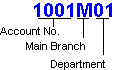
When you print or display a report, you can filter the report using wild card characters. In this example, if you wanted to see a report for only Department 01, you would type *****01 in the report filter options under use wildcards. Or if you wanted to see only information on the Main branch, you would type ****M**.
 Tell me how to get to the report filter options
- Select Reports & Forms.
- Select General Ledger.
- Highlight the report you want to print.
- Click Options in the toolbar.
- The account masking option is in the Filters section.
In addition, you have the option of creating Account Segments that formally divide sections of your Account ID and allow you to filter General Ledger reports and Financial Statements quickly and easily. (Sage 50 Premium Accounting and higher) How do I set up and use account segments?